Digital Sign Types
Digital signage goes beyond static displays, offering dynamic, programmable options that inform, engage, and capture attention across any environment.
LED Signs
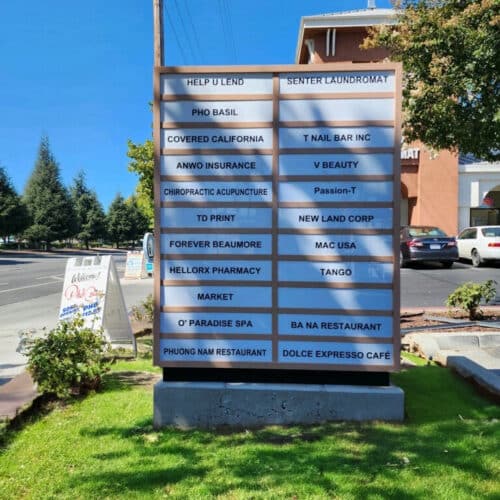
• Monument LED Signs: freestanding at entrances, shopping centers, or campuses
• Building-Mounted LED Signs: mounted on walls for visibility from roads or walkways
• Message Centers (EMCs): programmable boards that display text, graphics, or animations
• Illuminated Building Signage: front-lit, backlit, or halo-lit letters and displays that keep your brand visible after dark

Digital Displays
• Video Walls: large tiled LED or LCD screens used in lobbies, stadiums, or retail
• Menu Boards: digital displays for restaurants, cafeterias, and concession stands
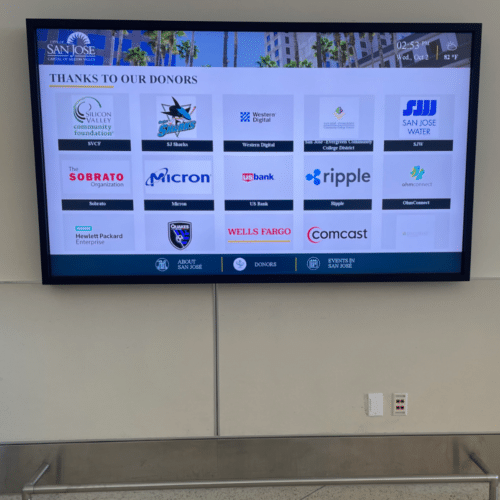
• Informational Screens: placed in lobbies, corridors, or breakrooms for announcements
• Conference Room / Meeting Room Signs: small panels showing schedules and room status


Interactive Digital Kiosks
• Wayfinding Kiosks: touch-enabled maps for campuses, hospitals, malls, airports
• Self-Service Kiosks: ticketing, check-in, payment, or ordering stations
• Directories: interactive business or tenant listings for office buildings and retail centers


Specialty Digital Signs
• Wayfinding Kiosks: Transportation Displays: flight, train, or bus schedules
• Scoreboards & Stadium Screens: real-time game and event information
• Window Projection / Transparent LED: integrates into glass for storefront advertising
• Outdoor Digital Billboards: large-scale roadside advertising displays
• Outdoor Digital Signage: weatherproof programmable displays for dynamic messaging, promotions, or real-time updates


Corporate & Institutional Digital Signs
• Employee Communications Screens: KPI dashboards, HR info, safety alerts
• Education & Campus Boards: class schedules, events, wayfinding
• Healthcare Digital Signage: patient information, queue systems, directories

Frequently Asked Questions About Digital Signs
What is digital signage?
Digital signage is the use of electronic displays to show content that can change, such as video, images, text, schedules, and live data. It includes lobby screens, digital menu boards, video walls, interactive kiosks, and LED message centers, both indoors and outdoors.
How does digital signage work?
A digital sign has four basic parts: a display, a media player, content management software, and a network connection. You create or upload content, schedule when it should play, and the software sends it to the media player, which shows it on the screen. You can update one screen or many from a single dashboard.
What is a digital signage system?
A digital signage system is the complete setup that makes a digital sign work: the displays, mounts and enclosures, media players, content management software, network connection, and the content itself. All of these parts are chosen to work together and are managed as one system.
What is the difference between digital signage and a TV?
A TV is built for home use a few hours a day. Commercial digital signage displays are built to run many hours a day, often all day, and are brighter, sturdier, and easier to manage remotely. They also come with commercial warranties, mounting options, and connections for central content control. Using a consumer TV for business signage usually means shorter life and a voided warranty.
What are the benefits of digital signage for businesses?
- Instant updates: Change a message in minutes without printing or reinstalling anything.
- Consistent messaging: Send the same content to many locations at once.
- More attention: Motion and video catch the eye more than static signs.
- Scheduling: Show breakfast and dinner menus, or daily announcements, at the right times.
- Live information: Display schedules, dashboards, and alerts.
- Less printing: Fewer reprints as promotions and details change.
What equipment is needed for digital signage?
Digital signage typically requires the following components:
- Display Screen: LED, LCD, video wall, or interactive touchscreen.
- Media Player: A dedicated device that stores and plays content on the display.
- Content Management System (CMS): Software used to schedule, update, and manage content remotely.
- Internet or Network Connection: Enables content updates and remote management.
- Mounting Hardware: Wall mounts, ceiling mounts, kiosks, or freestanding displays.
- Power Supply & Cabling: Electrical connections and data cables for operation.
For larger office, retail, healthcare, or corporate campus deployments, digital signage systems may also include interactive kiosks, video walls, content scheduling software, and centralized management platforms to control multiple displays from a single location.
Can digital signage content be updated remotely?
Yes. Most modern digital signage systems allow content to be updated remotely through a Content Management System (CMS). Users can manage text, images, videos, announcements, and playlists from any internet-connected device, making it easy to keep content current across one or multiple locations.
Remote updates are commonly used for:
- Corporate communications
- Office announcements
- Visitor information
- KPI dashboards
- Promotional content
- Emergency messaging
This centralized approach saves time, ensures consistent messaging, and allows content to be scheduled or updated in real time.